
Sinclair QL Power Supply Pinout
The Sinclair QL takes +9V DC and 15.6V AC through a 3-contact connector, and neither figure is 5V. Here is what sits where, what the AC rail actually drives, and how to test a supply.
July 27, 2026
Every other machine on this site takes at least one rail at 5 volts, because that is what the logic runs on. The Sinclair QL takes +9V DC and 15.6V AC, and generates its 5V rail itself.
That single difference makes the QL supply the least substitutable one we build. There is no other machine whose supply is even approximately right, and the numbers are unusual enough that an improvised replacement is almost guaranteed to be wrong.
Read this first. Contact positions are shown as you look into the socket on the computer. Confirm every rail with a multimeter before you solder anything — and note that one of the two rails here is AC, so measuring it on a DC range will read close to nothing and tell you the supply is dead when it is not.
The power connector
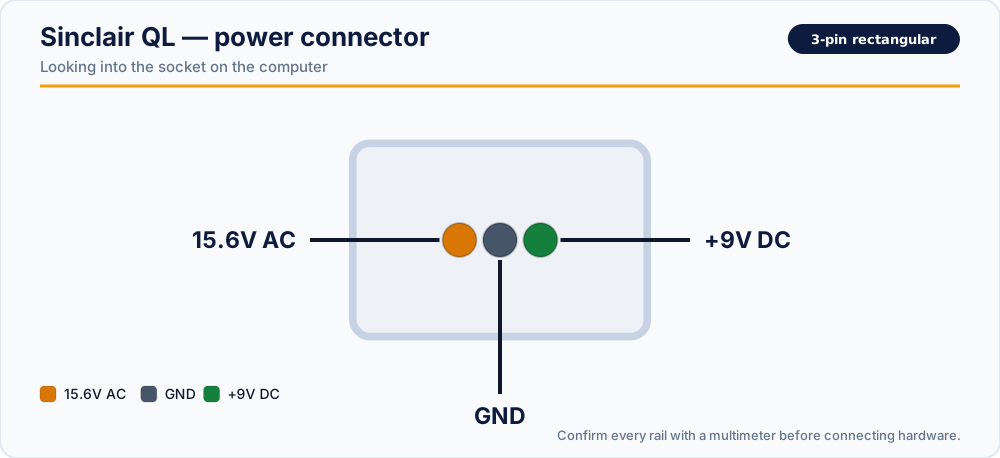
| Position | Rail |
|---|---|
| Left | 15.6V AC |
| Centre | GND |
| Right | +9V DC |
Three contacts in a single row, all labelled. The centre contact is the common return for both rails — the AC rail is measured between the left contact and the centre, not between two AC legs as on a Commodore machine.
What each rail does
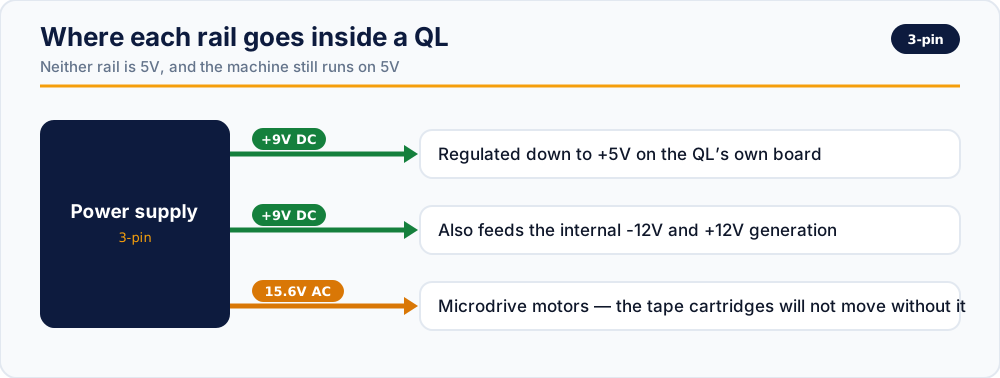
+9V DC — regulated down inside the machine
The QL does its own regulation. The 9V arriving at the connector is dropped to +5V on the QL's own board for the 68008 and the logic around it, and is also the source for the machine's internal ±12V generation.
This has one consequence worth understanding: the QL is more tolerant of its input than a C64 is, because it has a regulator of its own standing between the supply and the chips. A C64 with a drifting brick is destroyed; a QL with a slightly high input mostly makes its own regulator run hotter. That is a difference of degree, not a licence — a sufficiently wrong input will still cause damage, and the regulator's heat is itself a well-known QL failure point.
15.6V AC — the Microdrives
This is the rail that surprises people. A quarter of an amp, an odd voltage, and it exists to drive the Microdrive motors.
If a QL powers up, boots, and displays perfectly but the Microdrive cartridges will not move, this rail is the first thing to check. It is easy for a supply to lose it while the DC rail still measures fine, and the symptom looks like a mechanical fault in the drive rather than a power fault.
It is also easy to miss it entirely when testing, because a meter left on the DC range reads almost nothing across an AC rail.
What our replacement delivers
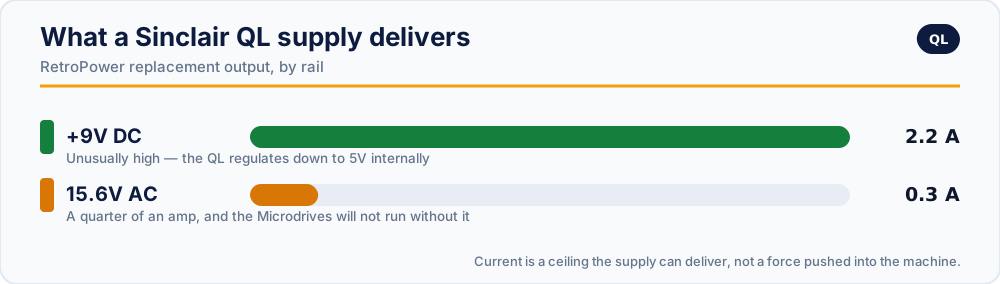
| Rail | Output |
|---|---|
| +9V DC | 2.2 A, stabilised and filtered |
| 15.6V AC | 0.25 A, transformer-generated |
With over-voltage and over-current protection, fusing on both the AC and DC sides, and full isolation between them.
Checking a supply before you trust it
With the supply on mains and disconnected from the computer, probe the plug. Both measurements are taken against the centre contact.
- Set the meter to DC volts. Right contact to centre: expect close to +9.0 V — not 5 V. A reading near 5 V means you are holding a supply for a different machine.
- Switch the meter to AC volts. Left contact to centre: expect roughly 15.6 V AC.
- Step 2 is the one people skip. Do not — a QL with no AC rail is a QL with no Microdrives, and the fault will look mechanical.
- Watch the DC rail for a minute. Upward drift as the case warms is a failing regulator.
Nothing else on this site will power a QL. Not a Spectrum supply, despite both being Sinclair machines — the Spectrum's multi-rail supply delivers +5V, +12V and −12V DC and has no 15.6V AC rail at all. The connectors differ too, and that is the only thing stopping the substitution.
Replacement supplies
- RetroPower PSU Sinclair QL — US plug · International plug
- RetroPower PSU Sinclair QL with OLED display — US plug · International plug
Related reading
- ZX Spectrum power supply pinout — the other Sinclair, and nothing about it is the same
- Volts, amps and 9V AC explained — why an AC rail is left as AC
- Retro power connectors: quick reference
Vintage power supplies carry mains voltage inside, and can hold dangerous charge after being unplugged. If you are not experienced with mains electricity, do not open one.